
Learn now how to create the trending hotel lobby Rap: step by step to propel your TikTok account to the heights of buzz.
Indeed, you have probably already seen these hilarious meme animations featuring celebrities or animals dancing in an orange studio.
Therefore, today we will discover together the secrets of this fascinating digital creation so that you can reproduce this masterpiece very easily.
The origin of the Hotel Lobby viral trend
To begin, let me tell you a little story about the origin of this incredible meme that has been invading our screens for some time now.
In fact, it all started in 2022 when the famous rappers Quavo and Takeoff released their hit song titled "Hotel Lobby".
On this occasion, they recorded a memorable performance for the famous YouTube channel "A COLORS SHOW", known for its clean, monochrome sets.
However, internet users have recently rediscovered this iconic video thanks to the creative power of generative artificial intelligence.
Consequently, many content creators are now having fun replacing the faces of artists with historical figures, politicians, or even their own pets.
That's why this trend, often called the "Rap Hotel Lobby Train", continues to rack up millions of views every day on TikTok and Instagram.
Why is this concept so popular on TikTok?
Firstly, the strength of this format lies primarily in its striking visual contrast and its particularly catchy musical rhythm.
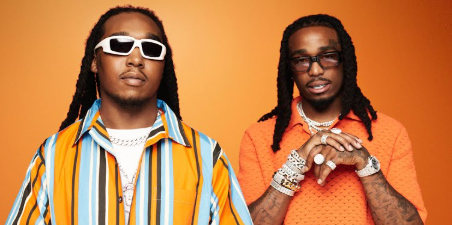
Moreover, the simplicity of the bright orange decor immediately catches the eye of the user scrolling through their news feed on their phone.
Thus, the algorithms of the platforms love this type of dynamic content that holds the attention of viewers for several consecutive seconds.
Moreover, you absolutely do not need to be a professional editor or a special effects expert to participate in this creative adventure.
Thanks to new mobile applications, anyone can generate this funny clip in less than two minutes.
That's why I strongly advise you to take the plunge today in order to maximize your chances of going viral on social media.
Step by step: the guide with the Starrd app
If you are looking for the fastest and most efficient method, the Starrd application is undoubtedly your best ally for this project.
Indeed, this specialized platform offers a pre-configured model that takes care of all the technical aspects for you.
Download the app: Go directly to the Google Play Store to install Starrd on your smartphone.
Select the template: Once your account is created, simply search for the template named "Hotel Lobby" in the integrated search bar.
Import your photos: Next, import two clear, good-quality images from your gallery, one for each character in the scene.
Generate the render: Finally, press the generate button to let the artificial intelligence merge your faces with the original animation.
However, please note that this automatic generation may require the use of paid credits within the application.
Therefore, make sure you choose your starting photos carefully to avoid wasting your free trials on blurry or poorly framed images.
The effective alternative is the online tool LightX.
On the other hand, if you prefer to work from a computer or use another interface, the LightX application stands out as an excellent alternative.
In fact, this online software also has an extremely powerful image processing tool to recreate the atmosphere of the orange studio.
To do this, open your usual web browser and log in to the official LightX website to access their AI video creation section.
Next, drag and drop your media files into the indicated areas and let the magic of the algorithm work in the background.
Ultimately, you will obtain a high-definition video file in a vertical format ideal for your mobile publications.
My friendly advice: try using photos with exaggerated or funny facial expressions to make your creation even funnier and more memorable!
To go further: the method with AI prompts
However, the most demanding creators may prefer to design their own customized version using advanced video generators.
Indeed, tools like Runway or Luma Dream Machine allow you to precisely control every visual detail thanks to detailed text descriptions.
For example, you can ask the AI to place famous cartoon characters in an apple green studio instead of the traditional orange.
In this way, you will completely stand out from the competition by offering unique and highly original content to your community.
Examples of text descriptions to copy and paste
To help you get started quickly, here are some example descriptions that you can use directly in your video generation tools:
« Two funny cats singing in a bright orange music studio with a microphone hanging between them, highly detailed, 3D style. »
“Two medieval knights performing a rap song in a minimalist orange room, dynamic camera movement, realistic textures. »
Comparison of the best creation solutions
To help you make the best choice according to your needs and budget, I have prepared this very practical summary table.
Application Difficulty Time Required Rendering Quality Starrd App Very Easy Less than 2 minutes Excellent LightX Online Easy Approximately 3 minutes Very Good Generators
Learn now how to build the Rap Hotel lobby train: step by step
Don't hesitate to explore our other exclusive tutorials to discover even more exciting tech tips!
Frequently Asked Questions
Prompts Average More than 10 minutes Professional